The original code is from Explaining Computers.com with comments and our PWM Mods
Added bits explained
set up motor speed pin as pwm (new bit)
This defines the pulse width Modulation that Pin 2 applies
motor_speed = Pin (2, Pin.OUT)
pwm = machine.PWM(motor_speed)
pwm.freq(1000)
define duty cycle as percentage of 65536 (new bit)
Applied to motors by selection in control graphic
#pwm.duty_u16(16384) #25%
#pwm.duty_u16(32768) #50%
pwm.duty_u16(65536) #100%
Pin 2 and 3 are connected to Motor controller pins for each motors and
each outputs a PWM signal selected by using displayed webpage
Plan to use software to control speed
Set up one pin for Pulse Width Modulation DONE
use software to apply pin signal voltage to both motors DONE
set up two pins with pwm to control motors at separate speeds DONE
experiment with using a variable which changes automatically to change speed DONE
modify software to give alternative control options to pin using different layout options DONE
create different software versions for different speeds DONE
Plan for changes to display
use software to change control signals on the fly DONE
Code
HTML for Controller
contents = '''<!DOCTYPE html>
<html lang="en">

<head>
    <meta charset="utf-8">
    <meta name="viewport" content="width=device-width, initial-scale=1">
    <title>jQuery UI Slider - Vertical slider</title>
    <link rel="stylesheet" href="https://code.jquery.com/ui/1.14.1/themes/base/jquery-ui.css">
    <link rel="stylesheet" href="/resources/demos/style.css">
    <script src="https://code.jquery.com/jquery-3.7.1.js"></script>
    <script src="https://code.jquery.com/ui/1.14.1/jquery-ui.js"></script>
    <script>
        $(function () {
            $("#slider-vertical1").slider({
                orientation: "vertical",
                range: "min",
                min: -10,
                max: 10,
                value: 0,
                slide: function (event, ui) {
                    $("#amount1").val(ui.value);
                },
                change: function (event, ui) {
                    $("#amount1").val(ui.value);
                }
            });
            $("#amount1").val($("#slider-vertical1").slider("value"));

            $("#slider-vertical2").slider({
                orientation: "vertical",
                range: "min",
                min: -10,
                max: 10,
                value: 0,
                slide: function (event, ui) {
                    $("#amount2").val(ui.value);
                },
                change: function (event, ui) {
                    $("#amount2").val(ui.value);
                }
            });
            $("#amount2").val($("#slider-vertical2").slider("value"));
        });
    </script>
    <style>
        #slider-vertical1,
        #slider-vertical2 {
            background-color: black;
            border-color: #f6931f;
            border-width: .1em;
            border-style: solid;
        }
        span {
            width: 40%;
        }
        div {
            color: black;
            font-weight: bold;
            font-family: Arial, Helvetica, sans-serif;
        }
    </style>
</head>

<body>
    <span style="float: left; padding-left: 2em; width: 40%;">
        <div>
            <label for="amount1">Left <br />Speed:<br /></label>
            <input type="text" id="amount1" readonly=""
                style="border:0; color:#f6931f; font-weight:bold; font-size: 1.5em;">
        </div>
        <div id="slider-vertical1" style="height:200px;"></div>
    </span>
    <span style="float: left; width: 40%;">
        <div>
            <label for="amount2">Right <br />Speed:<br /></label>
            <input type="text" id="amount2" readonly=""
                style="border:0; color:#f6931f; font-weight:bold; font-size: 1.5em;">
        </div>
        <div id="slider-vertical2" style="height:200px;"></div>
    </span>
    <div style="clear:both; padding-top: 2em;">
        <button id="left">Reset to Left</button>
        <button id="stop">Stop</button>
        <button id="right">Reset to Right</button>
    </div>
    <script>
        document.getElementById("left").onclick = (event) => {
            console.log('left ' + $("#slider-vertical1").slider("value"));
            $("#slider-vertical2").slider( "value", $("#slider-vertical1").slider("value") );
        };
        document.getElementById("stop").onclick = (event) => {
            console.log('stop')
            $("#slider-vertical1").slider("value", 0);
            $("#slider-vertical2").slider("value", 0);
        };
        document.getElementById("right").onclick = (event) => {
            console.log('right ')
            $("#slider-vertical1").slider("value", $("#slider-vertical2").slider("value"));
        };
    </script>
</body>

</html>'''

def main():
    browseLocal(contents)

def strToFile(text, filename):
    """Write a file with the given name and the given text."""
    output = open(filename,"w")
    output.write(text)
    output.close()

def browseLocal(webpageText, filename='tempBrowseLocal.html'):
    '''Start your webbrowser on a local file containing the text
    with the given filename.'''
    import webbrowser, os.path
    strToFile(webpageText, filename)
    webbrowser.open("file:///" + os.path.abspath(filename)) #elaborated for Mac

main()

Example Output
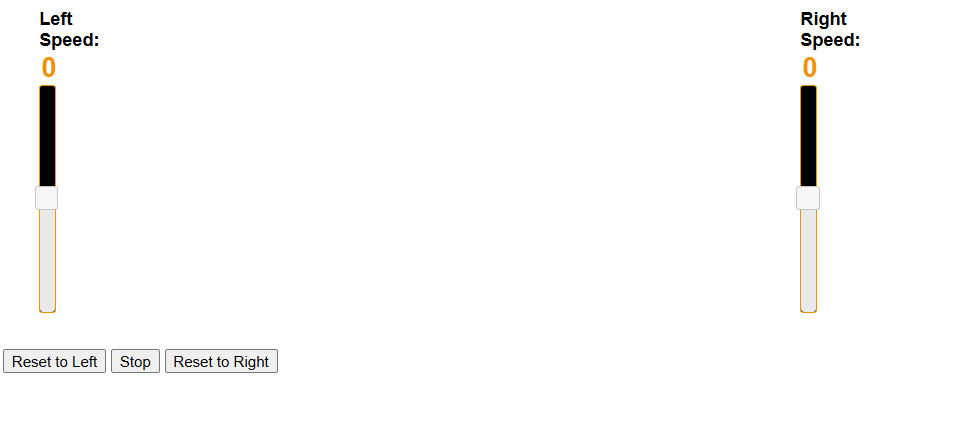
Code has been split to separate control signals and robot responses using a Pico for motor control
Pico code for motors
Using html and JavaScript on Laptop to control client and to send messages
We need to consider changing to a straight line when pointing in correct direction
Probably by change both tracks to match one of them at the preferred speed
Commands
- Each speed value ranges from -10 (max reverse) to
10(max forward) - Speed
0represents "stop"
🚗 Straight-Line Motion
| Movement | Command | Description |
|---|---|---|
| Forward | CMD 5 5 | Both tracks forward at medium speed |
| Reverse | CMD -5 -5 | Both tracks backward at medium speed |
| Stop | CMD 0 0 | Both tracks neutral |
🔁 Turning (Differential Steering)
| Turn Type | Command | Description |
|---|---|---|
| Gentle Left | CMD 3 7 | Right track moves faster than left |
| Gentle Right | CMD 7 3 | Left track moves faster than right |
| Sharp Left | CMD 0 7 | Significant speed differential |
| Sharp Right | CMD 7 0 | Significant speed differential |
| Pivot Left | CMD -5 5 | Left in reverse, right forward |
| Pivot Right | CMD 5 -5 | Right in reverse, left forward |